I recently wrote a post about network disaster preparedness and provided some tips on how to avoid network outages. I came across a great blog post that added more depth to the topic by discussing how to avoid the most common culprits for single points of failure on small to midsize networks. The post was written by Derek Schauland from TechReuplic and he highlights some network areas that I agree need particular attention.
1. Network Switches – Keeping spare switches online is ideal, but may be cost prohibitive. Consider having a couple of extra switches around in case of a failure.
2. Tape Drives – Ensure you have redundancy in terms of tape drives for back-up and recovery in case of a worst case scenario. You never know when a tape drive may stop working.
3. Network Interface Cards (NICs) – Use servers with multiple NICS for improved connectivity and for failover in case one of the cards in the server fails.
4. Internet Connections – Having redundant connections can be a critical part of avoiding a single point of failure, especially considering the importance of the Internet to business operations these days. Of course the cost of keeping a connection with two providers active needs to be justifiable for your business. At a base level, it never hurts to have a plan in place to immediately take action to move to a secondary provider if your primary fails.
5. Cabling – I’m adding to Derek’s list here, but cabling issues often cause LAN failures. It’s always worthwhile to have many spare cables of different lengths ready to go. I keep a few really long ones as spares in every telco/IT room. They are great for testing and at times when I need a temporary cable.
This will help you to solve, both the most basic and overlooked issues and the more dramatic ones. This list is not all inclusive, but these fives areas should be considered in planning for a worst case scenario. Do you have any additional areas that you pay particular attention to in your network?

Showing posts with label Continuity of Network Operations. Show all posts
Showing posts with label Continuity of Network Operations. Show all posts
Monday, November 23, 2009


Friday, October 16, 2009
Network Disaster Preparedness Tips
With the winter season approaching, big storms bringing everything from heavy rain and lightning to snow and wind will be a constant threat to network operations. When was the last time your local IT team reviewed disaster preparedness procedures? Now is a great time to start. If any form of a disaster hits, do you or your team know your capabilities and how to react? Here are some important questions that your IT team should be able to answer and use to improve your disaster procedures:
1. Are you aware of your power situation?
a. What happens when a power outage occurs?
b. What is the operational status of the UPS system?
c. How long will the UPS backup systems sustain key functions?
d. What do we do if the outage is longer?
2. What if the building becomes unavailable? (fire or water damage)
a. Are the offsite backups current?
b. If a network device or server is ruined, what is the procedure to replace it?
c. Does everyone know the primary and secondary facility contacts to use should an after-hours emergency occur?
3. What if access to the building is limited? (snow, tornado warnings, etc)
a. Is VPN access updated for all employees that may need to work from home?
b. Can all of the required maintenance procedures be done remotely or skipped for several days?
4. What if the phone and/or Internet connection is lost?
5. What is the customer impact when any of these conditions occur?
Advance planning is the best approach. A good network design can minimize the impact of storm and disaster related problems. Having redundant phone and data lines from different carriers minimizes the inbound/outbound traffic risk. Using an adequate number of UPS devices mitigates all but very lengthy power outages and network routing protocols like HSRP reduce the risk of single device point of failures.
Even monitoring your network with disaster prevention in mind can be helpful in avoiding unnecessary failures. These tips are a great starting point:
a. What happens when a power outage occurs?
b. What is the operational status of the UPS system?
c. How long will the UPS backup systems sustain key functions?
d. What do we do if the outage is longer?
2. What if the building becomes unavailable? (fire or water damage)
a. Are the offsite backups current?
b. If a network device or server is ruined, what is the procedure to replace it?
c. Does everyone know the primary and secondary facility contacts to use should an after-hours emergency occur?
3. What if access to the building is limited? (snow, tornado warnings, etc)
a. Is VPN access updated for all employees that may need to work from home?
b. Can all of the required maintenance procedures be done remotely or skipped for several days?
- Enable redundant polling of critical devices
- Map out HSRP primary and secondary links
- Know the status of the UPS systems
- Make sure you have 24x7 access to your management system client
If you have tips for network disaster prepardeness, please share them with us.
Tuesday, September 29, 2009
3 Key Steps to Actively Monitoring HSRP…
I recently discussed how to build a resilient network using HSRP/VRRP and as a follow-up, here are a few key steps to actively monitoring HSRP.
With HSRP on our network, there is a good deal of network reliability for end users. As the network engineer, this means when a link fails, end users rarely notice it. The backup link simply handles the load and business continues as usual. Just the way I want it. While my monitoring system does provide an alert to the link down condition, I like to handle these situations as a higher priority, since it has become a single point of failure.
Here are a few tips to actively managing your HSRP implementation:
1. Map out each pair – know when a primary route goes out, what path has been designated as the alternate (if you have many HSRP routes you can combine them onto a single map. The pre-created map makes it easy to find the paired item).
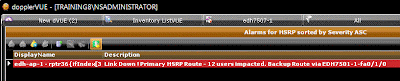
2. Create custom alerts for HSRP interfaces that indicate which path is a primary or secondary HSRP link. The HSRP interfaces need to be treated differently than a switch port to a user workstation due to their critical nature.
3. After service has been restored, review the interface load of the secondary link and evaluate how well it handled the traffic. Use this information to ensure your backup pipes have adequate capacity. This will improve your disaster recovery planning for any future events.
Here are some monitoring screenshots that show my HSRP map and an active alarm.
With HSRP on our network, there is a good deal of network reliability for end users. As the network engineer, this means when a link fails, end users rarely notice it. The backup link simply handles the load and business continues as usual. Just the way I want it. While my monitoring system does provide an alert to the link down condition, I like to handle these situations as a higher priority, since it has become a single point of failure.
Here are a few tips to actively managing your HSRP implementation:
1. Map out each pair – know when a primary route goes out, what path has been designated as the alternate (if you have many HSRP routes you can combine them onto a single map. The pre-created map makes it easy to find the paired item).
2. Create custom alerts for HSRP interfaces that indicate which path is a primary or secondary HSRP link. The HSRP interfaces need to be treated differently than a switch port to a user workstation due to their critical nature.
3. After service has been restored, review the interface load of the secondary link and evaluate how well it handled the traffic. Use this information to ensure your backup pipes have adequate capacity. This will improve your disaster recovery planning for any future events.
Here are some monitoring screenshots that show my HSRP map and an active alarm.

Figure 1. HSRP MAP (Primary is solid line, Secondary is dashed line)

Figure 2. HSRP Active Alarm – (identifies HSRP link route impacted)
Subscribe to:
Posts (Atom)